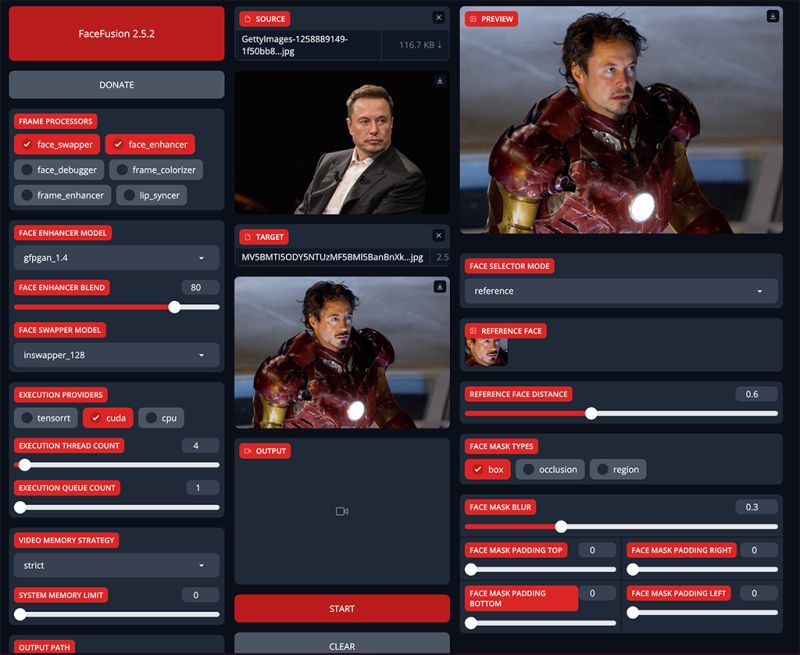
FaceFusion is a modern AI-powered face-swapping application designed to make face replacement, face blending, and identity transformation simple and accessible. Unlike complex tools that require technical configuration, FaceFusion focuses on ease of use, quick processing, and practical results. It is widely used for entertainment content, social media edits, AI creative projects, and casual experimentation with face manipulation technology.
What FaceFusion Does
FaceFusion allows users to:
- Swap a person’s face onto another photo or video.
- Blend two faces together to create hybrid facial identities.
- Replace identities in video frames automatically.
- Generate AI-enhanced face edits with minimal effort.
The tool uses artificial intelligence and deep learning models to analyze facial landmarks, match shapes, adjust lighting, and blend skin tones so that the output looks natural and consistent with the target image or video.
Key Features
1. User-Friendly Interface
FaceFusion is built for simplicity. The interface is clean, intuitive, and does not require specialized technical knowledge.
2. Fast Processing
Compared to highly technical tools like DeepFaceLab, FaceFusion processes face swaps much faster, making it suitable for users who want quick results.
3. Multi-Platform Availability
FaceFusion is available on multiple systems depending on the build or distribution, making it flexible for different environments.
4. AI-Powered Accuracy
The application utilizes trained AI models to detect facial structure and expressions, aligning faces accurately with impressive consistency.
5. Minimal Configuration Required
Most of the workflow is automated. Users typically only need to provide input images or videos, and the system handles the rest.
Strengths of FaceFusion
- Ideal for beginners and casual users.
- Produces visually convincing results for general use.
- Faster and easier than professional deepfake tools.
- Suitable for entertainment, memes, creative edits, and short-form content.
- Requires significantly less setup time.
Limitations to Consider
FaceFusion prioritizes accessibility over professional-grade control. While results are good, tools like DeepFaceLab still deliver superior photorealism, especially in:
- cinematic projects
- professional film work
- high-detail close-up videos
FaceFusion may struggle slightly with extreme lighting, very dynamic movement, or complex facial angles. For high-end or highly realistic deepfake production, more advanced tools remain preferable.
Who Is FaceFusion Best For?
- FaceFusion is an excellent choice for:
- Content creators who want fast face swaps.
- Casual users experimenting with AI faces.
- Social media and meme creators.
- Beginners learning face-editing technology.
Users who require industry-level realism for filmmaking, research, or professional editing may prefer more advanced, technically demanding platforms.
Conclusion
FaceFusion provides a powerful balance between AI capability and user accessibility. It delivers quick, reliable, and visually convincing face-swapping results without requiring deep technical expertise. While it may not fully replace heavyweight solutions for professional studios, it is one of the best tools for everyday users who want simple, effective, and enjoyable AI-powered face editing.
Pinokio: Download
FaceFusion 3.4.1 page: Download
FaceFusion 3.4.1: Download